


TL;DR
Plan on two to four weeks of gradual sending before a new domain carries full cold volume. Neither Google nor Microsoft publishes a number, so treat it as a rule of thumb, and start the clock today even if your list isn't ready.
Warm up and send with ManyPITwo to four weeks. That's the rule of thumb most cold email teams use before a brand-new domain sends at full volume, ramping from a handful of emails a day to somewhere around 30 to 50 per inbox. Neither Google nor Microsoft publishes a warmup period, so nobody can give you an official number. What they do publish are the signals they watch, and warmup is just the time it takes to build a good record on them.
If you're in a hurry, the most useful thing you can do is start today. The calendar is the bottleneck, and no amount of preparation later gets those weeks back.
What warmup actually does
A new domain has no sending history. When it suddenly sends hundreds of emails to strangers, mailbox providers have nothing to judge it by except that behaviour, and that behaviour looks like spam.
Warmup gives the domain a history: a small, steady volume of mail that gets delivered, doesn't bounce, rarely gets marked as spam and sometimes gets replies. Google's sender guidelines focus on exactly those signals, especially the spam rate, which Google asks senders to keep below 0.10%.
A typical ramp
This is a common starting point, not a published limit. Adjust it based on bounces and replies.
Week | Cold emails per inbox per day | What to watch |
|---|---|---|
1 | 5 to 10 | Every message delivered, no bounces |
2 | 10 to 20 | Some replies coming in |
3 | 20 to 30 | Spam rate and bounces still low |
4 onwards | 30 to 50 | Hold here rather than pushing higher |
If bounces climb or replies stop, hold at the current level for a few more days before stepping up again.
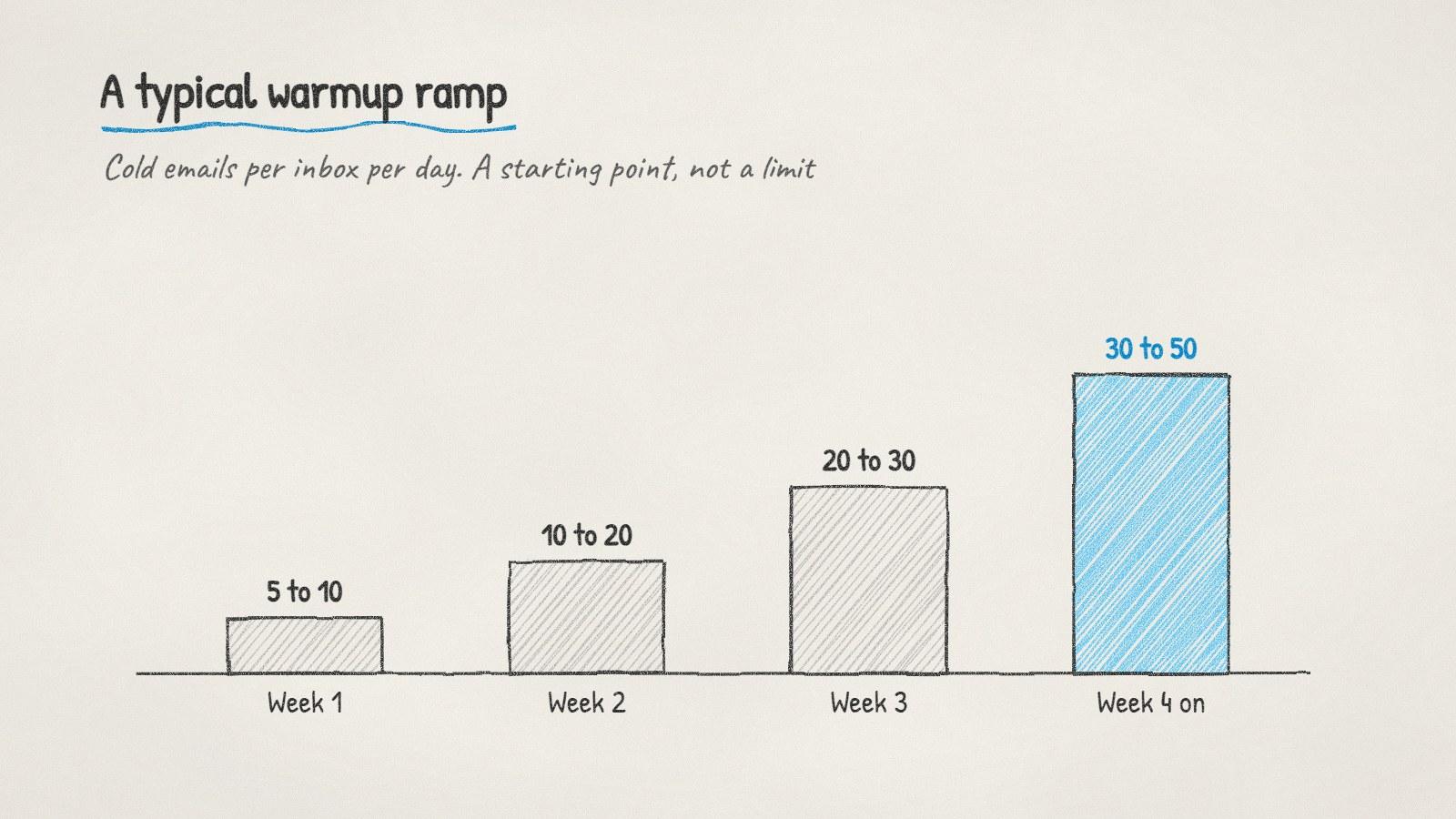
A common warmup ramp for one inbox. Hold a level longer if bounces climb or replies stop.
What makes warmup faster or slower
Some things you control shorten the ramp:
Authentication from day one. Set up SPF, DKIM and DMARC before the first email. Our guide to setting up a domain for cold email covers each record.
A real website on the domain. Even a simple page, or a redirect to your main site, makes the domain look like a business rather than a throwaway.
Verified addresses only. Bounces early in a domain's life hurt more than later ones, because there's little good history to balance them.
Plain, short messages. Skip attachments, images and tracking links while the domain is new.
Replies. Emails that start conversations are the strongest signal you can send.
And some things slow it down: buying lists, sending big batches at once, and changing volume abruptly from one day to the next.
Warmup networks or real sending?
There are two ways to warm a domain. Warmup networks send automated emails between inboxes that have signed up for the service, opening and replying to each other to create engagement. Ramping real outreach means sending a slowly growing number of genuine cold emails to verified prospects.
Opinions differ on warmup networks. Their supporters say they build engagement quickly. Their critics point out that mailbox providers try to detect artificial engagement, and that the engagement isn't from your real audience. Ramping real sends is slower to set up but has no such question hanging over it, and every email in the ramp is also a real prospect.
Can you skip warmup if you're in a rush?
You can send small volumes from an existing, established inbox right away. The trade-off is risk: if a cold campaign goes badly from your main company domain, it can hurt delivery of your everyday business email too.
Option | How fast | Risk |
|---|---|---|
Low-volume cold email from your main domain | Today | Your main domain's reputation |
New secondary domain, warmed up | Two to four weeks | Low, and isolated from your main domain |
Both: a few personal emails now, a new domain warming in parallel | Today, then scale | Low if the main-domain volume stays small |
The third option is what most teams in a hurry end up doing.
Doing it with ManyPI
Disclosure: ManyPI is our product.
ManyPI ramps each new inbox's daily volume gradually as part of sending, so warmup happens with real, verified prospects rather than a separate network. When you connect an inbox, it checks the domain's SPF, DKIM, DMARC and MX records and gives you a ready-to-paste record for anything missing. Every address is verified before a campaign can use it. Our free cold email volume calculator estimates how long the warmup takes for the volume you're aiming at, and the cold email outreach page covers the rest.
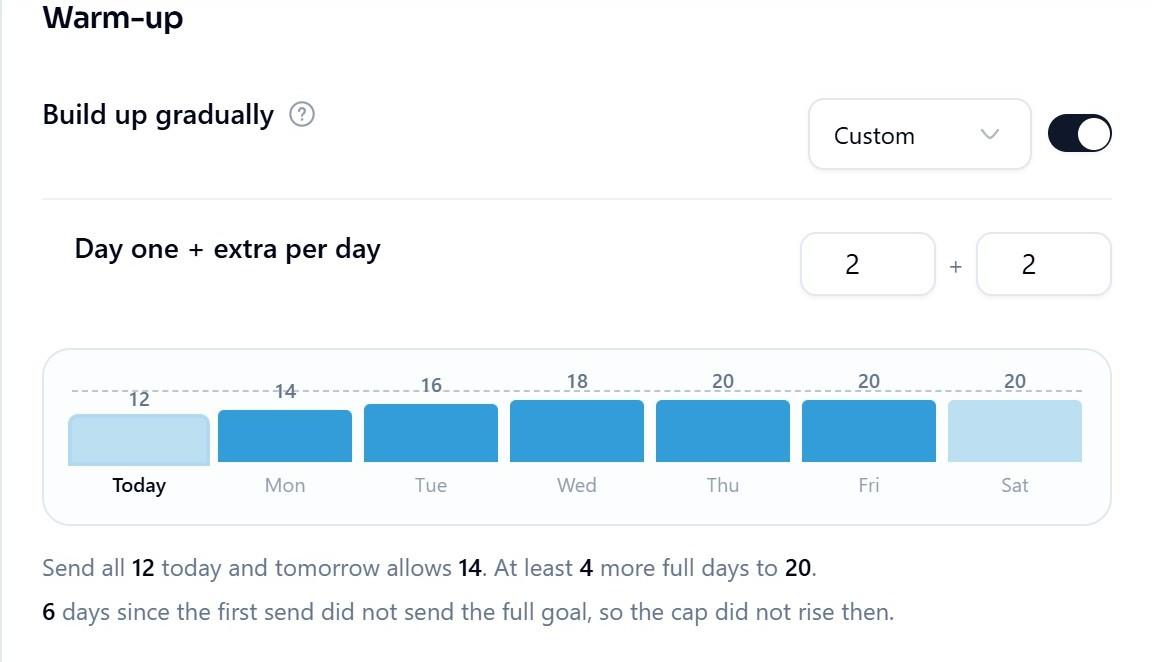
An inbox warming up in ManyPI. The daily cap only rises after a day that sent its full goal.
The mistake to avoid is waiting until the list is ready to buy the domain. Buy it, set up the records and start the ramp now. By the time the list is built, the domain will be ready for it.
Written by
Ole Mai
Founder / ManyPI