


TL;DR
Outlook returns 550 5.7.515 when a domain sending at volume fails its authentication checks. Publish SPF, DKIM and a DMARC record, make one of them align with your From domain, test, then resend.
Check your domain's recordsIf your emails to Outlook.com, Hotmail, Live.com or MSN addresses are bouncing with "550 5.7.515 Access denied, sending domain [your domain] does not meet the required authentication level", Microsoft has decided your domain can't prove who it is. The fix lives in your DNS, and you can usually make it the same day without contacting anyone at Microsoft. This bounce gets asked about a lot in r/sysadmin and r/Office365.
What the 550 5.7.515 error means
Microsoft's support page for the error says it applies to mail sent to its consumer services: Outlook.com, Hotmail, Live.com and MSN. The rules cover high-volume senders, which Microsoft defines as sending 5,000 or more messages to those services with the same domain in the From address.
Once a domain is over that line, every message from it has to pass authentication. The ones that don't come back with this code.
The count is per From domain, not per inbox. If several people or tools send as `yourcompany.com`, their volume adds up, which is how teams that think of themselves as small senders end up seeing this error.
What Microsoft requires
Requirement | What it means | How to check |
|---|---|---|
SPF | Your SPF record lists every server that sends for you, and the check passes | The message headers show spf=pass |
DKIM | Messages carry a DKIM signature, and it passes | The headers show dkim=pass |
A DMARC record | A TXT record at `_dmarc`, at least `v=DMARC1; p=none` | Look up `_dmarc.yourdomain.com` |
DMARC passes | SPF or DKIM aligns with the domain in your From address | The headers show dmarc=pass |
Microsoft accepts any DMARC policy here, including `p=none`. What it won't accept is no record at all, or a record your mail fails.
Fix it in this order
Read the bounce. It names the sending domain Microsoft rejected. That's the domain whose DNS you're fixing, even if your website lives somewhere else.
List everything that sends as that domain. Google Workspace or Microsoft 365, your cold email tool, a newsletter platform, the CRM, an invoicing app. Each one needs to be covered by SPF and sign with DKIM for your domain.
Publish what's missing. Keep a single SPF record that includes every sender, and stay under SPF's limit of 10 DNS lookups (RFC 7208). Turn on DKIM in each provider's admin settings. Add a DMARC record, starting at `p=none` with a reporting address.
Check alignment. For DMARC to pass, the DKIM signing domain or the return-path domain has to match your From domain. A tool that signs with its own domain passes DKIM and still fails DMARC.
Test before you resend. DNS changes can take a few hours to show. Send one message to an Outlook.com address you control and look for three passes in the headers.
Resend to the addresses that bounced, in small batches, watching for new bounces.
Our guide to setting up a domain for cold email has example records for Google Workspace and Microsoft 365.
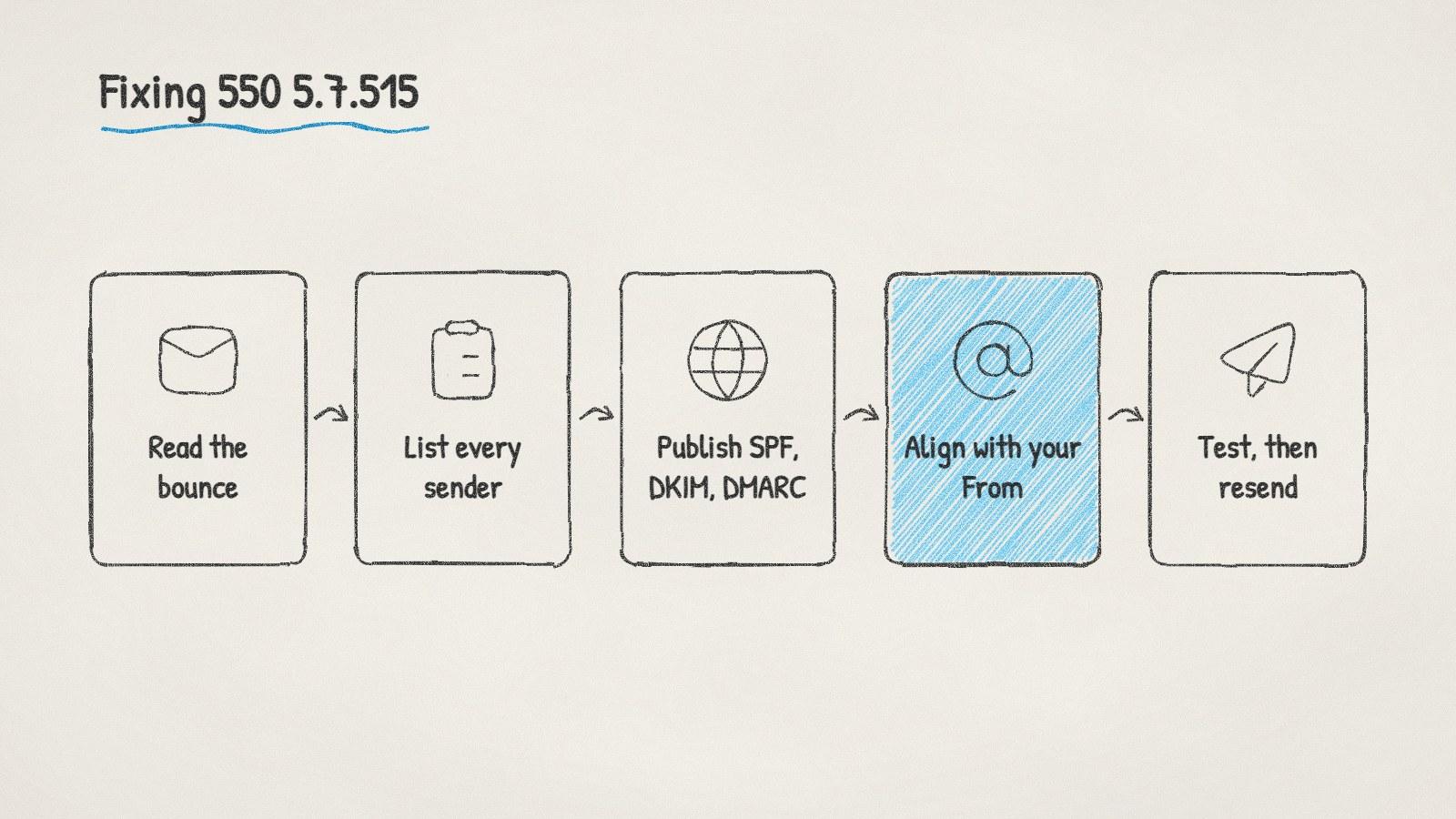
Fixing 550 5.7.515, step by step. Alignment is the step people miss.
Other Microsoft bounces that look similar
Microsoft uses several codes that read alike but need different fixes:
Bounce | What it means | What to do |
|---|---|---|
550 5.7.515 | Your domain fails authentication at volume | Fix SPF, DKIM and DMARC, as above |
550 5.7.606 to 649 | The sending IP is on Microsoft 365's blocked senders list | Request removal at the Office 365 Anti-Spam IP Delist Portal. Microsoft says it can take 24 hours or longer |
550 5.7.511 | The sender is banned pending investigation | Forward the full bounce to delist@microsoft.com. Microsoft says it replies within 48 hours |
Outlook.com bounces naming a block list | The IP is blocked by the consumer service | Use Microsoft's Outlook.com delisting form after reading its sender FAQ |
The delist routes come from Microsoft's page on using the delist portal. IP blocks mostly hit people who send from their own server or a shared host. If you send through Google Workspace or Microsoft 365, the sending IPs belong to them, and a 5.7.515 is about your domain, not the IP.
While you're fixing it
Pause sends to Outlook.com, Hotmail, Live.com and MSN addresses from the affected domain until a test passes. More sends only produce more bounces.
Check Gmail at the same time. Google's sender guidelines require SPF or DKIM from every sender, and SPF, DKIM and DMARC from anyone sending more than 5,000 messages a day to Gmail. If Microsoft is rejecting you over missing records, Gmail is probably filtering the same mail.
Doing it with ManyPI
Disclosure: ManyPI is our product.
When you connect an inbox, ManyPI checks its sending domain's SPF, DKIM, DMARC and MX records, and gives you a ready-to-paste record for anything missing. Sends from each inbox are paced across the day under a daily cap you set, and bounce protection pauses an inbox when bounces pass your limit, before a bad day turns into a blocked domain. The cold email outreach page covers how sending works.
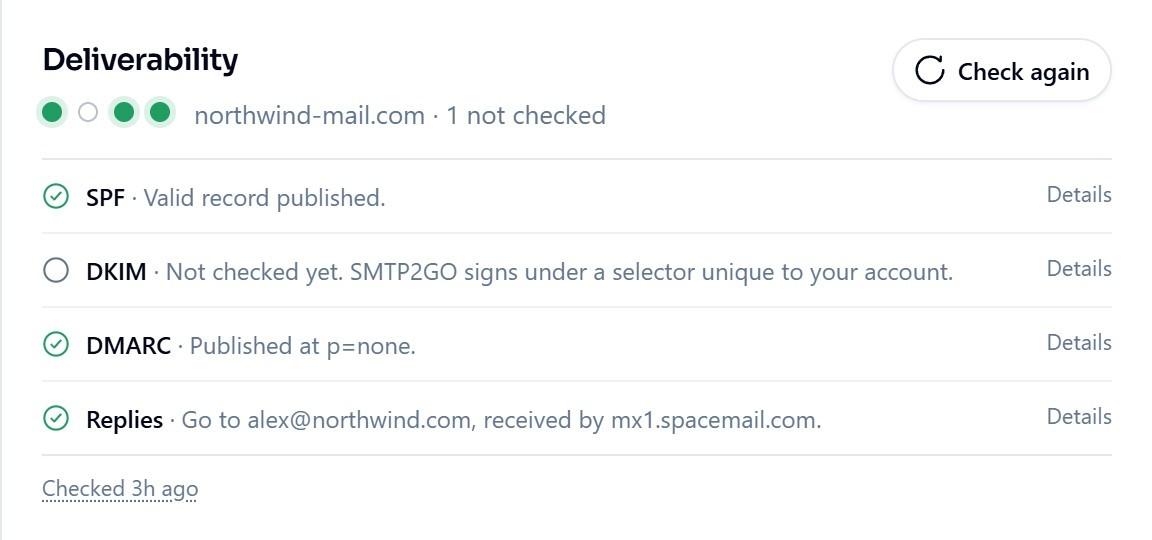
ManyPI's deliverability checks on a connected inbox, shown here with sample data.
If the headers show three passes and Outlook still won't deliver, your records aren't the problem any more. Look at reputation instead: our guide to cold emails going to spam walks through the other causes.
Written by
Ole Mai
Founder / ManyPI